FEATURES
EyeRelay delivers consistent series and styles that suit the session. It takes over the demanding work in Capture One and the repetitive operations, while the final decisions remain yours. This page describes every function of version 2.0, step by step. Steps marked AI use the local model on your Mac when it is installed. Without the model they still run, with a simpler result. Your photos never leave your Mac.
SEVEN STEPS
PHOTOS IN DNG
Point EyeRelay at a memory card or any folder. Raw files are converted to DNG copies with the free Adobe DNG Converter, and the session receives its folder structure. The originals are set aside and never modified.
CULLING – TASTE MODEL
EyeRelay groups the session into scenes and proposes the frames worth keeping, assessing sharpness, closed eyes, facial expression and duplicates. In Pro, the ranking also reflects your taste model, which learns from the frames you kept in earlier sessions. You decide how many scenes and how many frames per scene to keep.
- 1.a
Your picks
A fast full-screen view for keeping and rejecting frames, comparing up to four side by side, zooming to 100% and checking faces with a loupe. Photos added later are marked NEW, and your earlier decisions are preserved.
- 1.b
Capture One catalogs
EyeRelay prepares a session catalog and a working catalog inside the session folder. Your main catalog remains untouched.
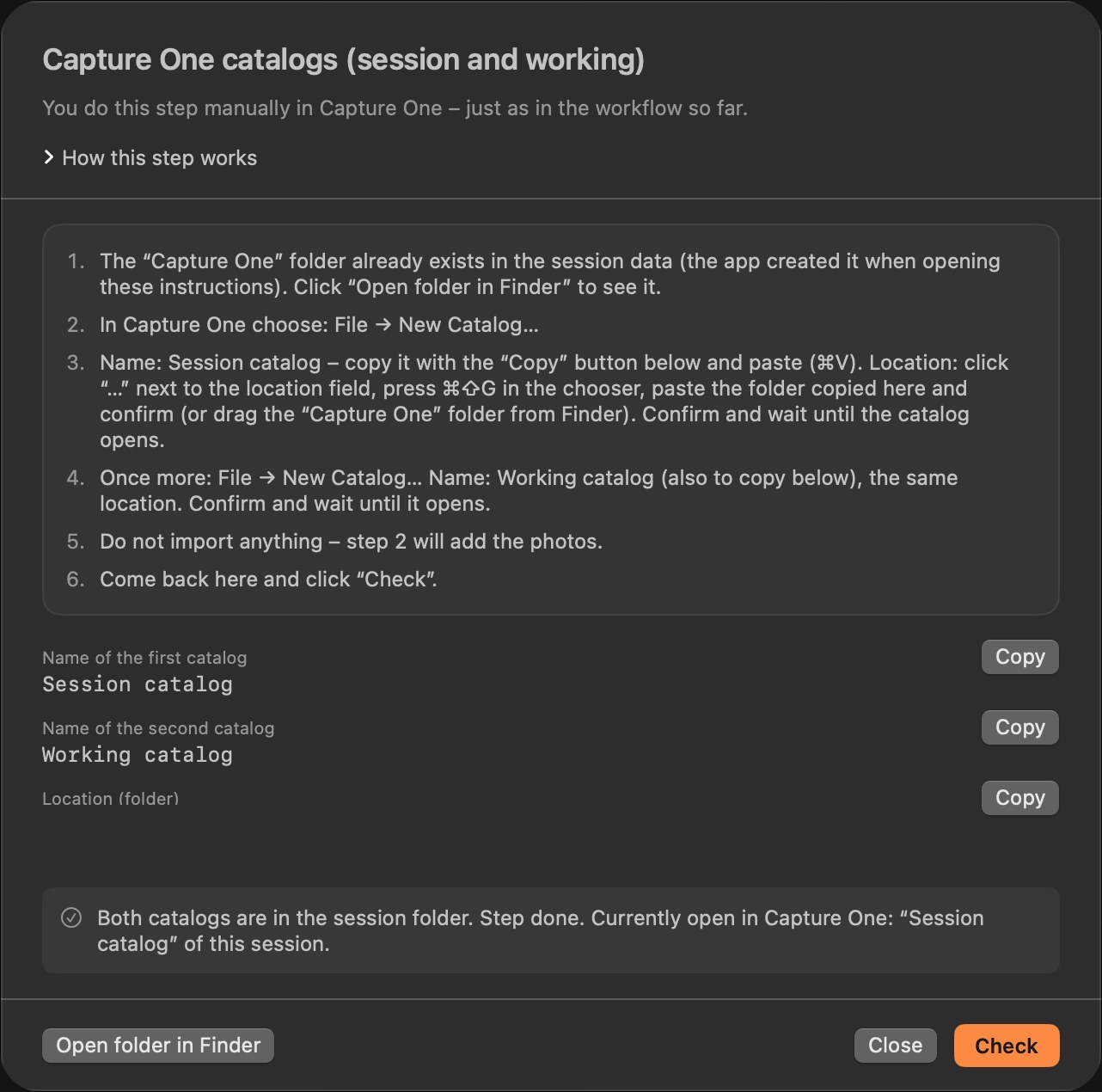
Manual steps come with precise instructions, and EyeRelay verifies the result. - 1.a
NEUTRAL DEVELOPMENT ✦ AI
A clean, neutral variant next to the original in Capture One, with white balance measured on skin and neutral areas, natural skin tones and highlights that keep their texture. Each series is processed separately and calibrated on control exports, so every series starts from the same neutral base. Photos that need your attention are marked in Capture One with the reason.
- 2.a
Your rating and keywords
In Capture One, you give 3★ to the frames worth refining and add who and where, for example with Model and Scene keywords. EyeRelay reads them back.
- 2.a
AUTO-REFINEMENT ✦ AI
Styles are first applied to a sample, so you can choose, and then to the whole selection. EyeRelay adjusts exposure and colour for each frame to achieve the intended look of the style. Standard includes Natural and Natural B&W. Pro adds session types with their style packs and your own Capture One styles.
- 3.a
Versions for retouching
You give 4★ to the versions that go to retouching.
- 3.b
TIFF export for retouching
16-bit TIFF files are exported to the session folder, with names that link them back to the original photo.
- 3.c
External retouching
You retouch the TIFF files in the application you already use, for example Retouch4me. EyeRelay waits and shows which files are still missing.
- 3.d
Import of retouched files into Capture One
Retouched files return to the session catalog next to their originals. Black-and-white versions keep their black-and-white settings.
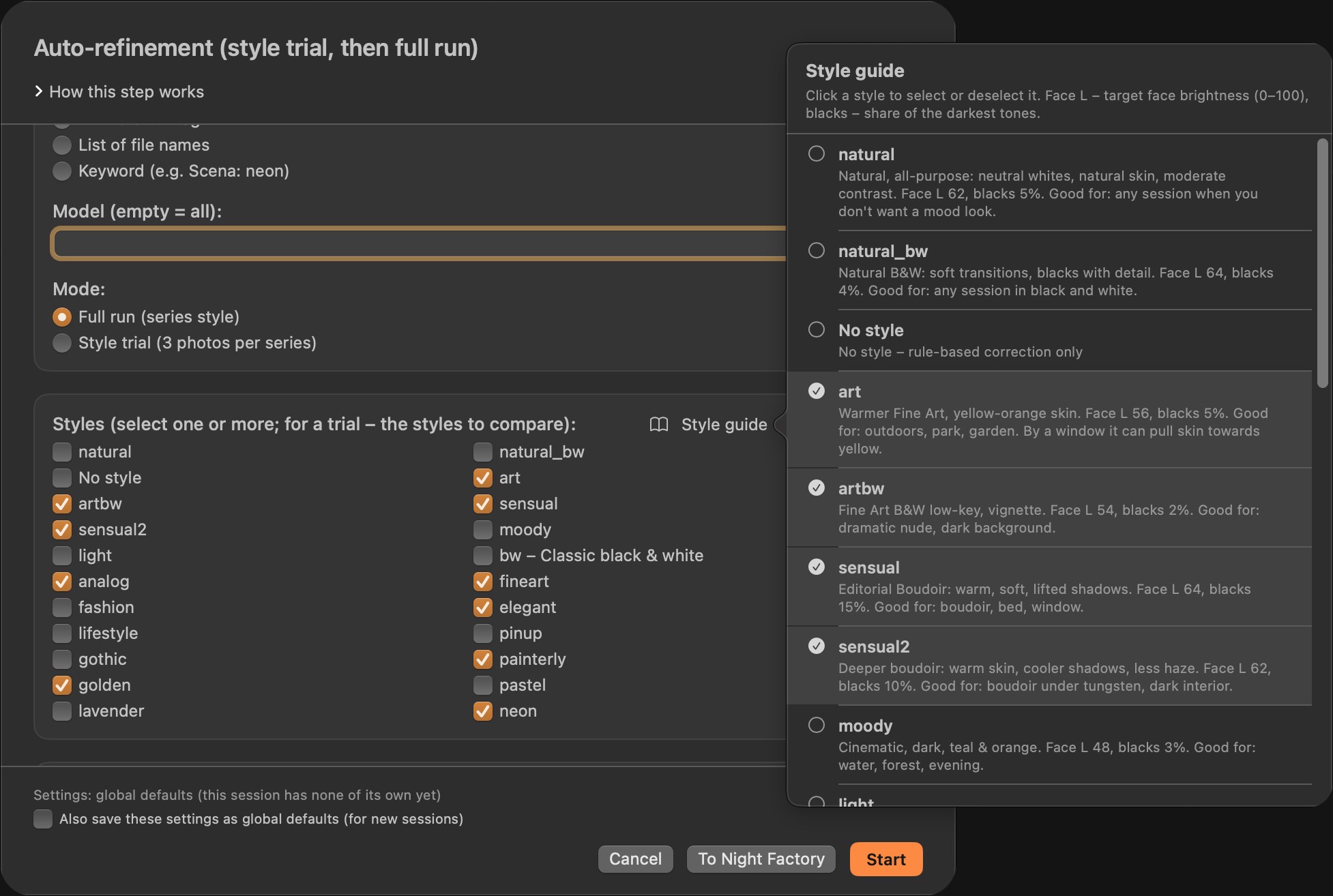
Choose the styles to compare. The style guide describes each style and the photos it suits. - 3.a
BEST OF THE BEST – TOURNAMENT ✦ AI
Pairs of your best frames are compared until a ranking emerges, so the strongest images stand out from a large selection.
- 4.a
Report and 5★ selection
A visual report of the tournament. Your final picks receive 5★.
- 4.a
JPG EXPORT ✦ AI
Client-ready JPG files in the session folder, with consistent sizes and file names.
SESSION CLOSE – CLEANUP
Temporary files and working data are cleaned up, with a summary of what was removed. Files are moved to the Trash and never deleted permanently.


ACROSS ALL STEPS
Session list
Every session with its progress, next step and shooting date. Search and filters for sessions in progress and completed sessions.
Step chain
Steps run one after another, and you can skip those you do not need. EyeRelay stops wherever your judgement is required and shows “Waiting for you”.
Night queue PRO
Several sessions in a queue, processed overnight. Your Mac stays awake while steps are running.
Live progress
Each step shows its current stage, a progress bar and the remaining time. The technical log is one click away.
Taste model PRO
Learns from the frames you keep and reject. It is stored only on your Mac. You choose which sessions it learns from and can reset it.
Optional local AI
EyeRelay checks your Mac before offering the AI model and warns you about memory before an AI step. Every step also runs without the model.
Contextual help
Each step explains what it does and what it needs from you.
Error reports with your consent
If a step fails, EyeRelay can send a technical report. You see it before it is sent, and it never contains photos.
English and Polish
The entire application, including step logs, is available in both languages.
Session backup
Every session is copied to a second drive or a NAS automatically after key steps, with a checksum for every file, earlier versions of changed files, regular integrity checks and restoration of the session as it was on a chosen day.
Encrypted cloud backup
The same backup in your own Google Drive or iCloud Drive, encrypted on your Mac before it is uploaded. The cloud provider receives only encrypted files.
License for two Macs
Activation on two Macs. When you move to a new Mac, you release the old one yourself.
EyeRelay Mobile PRO
Queue status and the current step on your iPhone and iPad, with a notification when your attention is needed at the Mac.
STANDARD AND PRO
Standard runs every step described above with the Natural and Natural B&W styles. Pro adds:
- The taste model in culling
- Session types with culling and styles tailored to the kind of work
- One style pack of your choice: Portrait, Wedding, Business & Event, School or Commercial
- Your own Capture One styles
- The night queue
- EyeRelay Mobile for iPhone and iPad